
A tyre business website needs to help customers find the service they need and contact the right depot. Before planning the design, agree which information a driver needs before visiting or asking for a quote. For an Irish tyre retailer, that includes the vehicles you serve, the work available at each location and what happens after someone sends an enquiry.
Describe the work the business offers in terms customers recognise. New tyres, puncture repairs, wheel balancing and alignment are different reasons to get in touch. Explain each service clearly enough for a visitor to choose a useful next step, with a route to ask when they are unsure.
Separate passenger vehicle services from commercial or agricultural work where the business provides them. Have your team approve any statements about the vehicles or equipment you can handle. Only list brands, specialist services and capabilities that reflect the current offering.
Give every genuine location its own clear address and directions link. Where you have more than one depot, label each map and explain any differences in opening hours or services. A customer should know which premises they are contacting and where they are expected to go.
Keep important location information in readable text as well as on a map. Include practical arrival details where they would help, such as the correct entrance to an industrial estate unit. Publish only details your team has confirmed and keep temporary closures visible when relevant.
Ask the team what they need to respond usefully to an enquiry. That may include tyre size, quantity, vehicle type and the customer’s preferred depot. Decide whether a vehicle registration or a photograph is useful, and explain how customers can provide information they are uncertain about.
Give fields clear labels and distinguish required information from optional preferences. If a customer does not know a tyre specification, provide a way to contact the team instead of forcing them to guess. The business should confirm suitability and availability through its agreed quotation process.
Where prices are displayed, state what the amount includes and identify anything priced separately. Explain whether the customer is requesting a quotation, asking for a callback or selecting a confirmed appointment. The button label and the message after submission should describe the same next step.
If a team member must check stock or fitting capacity, make that clear before the customer sends the request. Only show live availability when the system actually supports it. Explain whether customers should arrange a visit or can call in during the published hours.
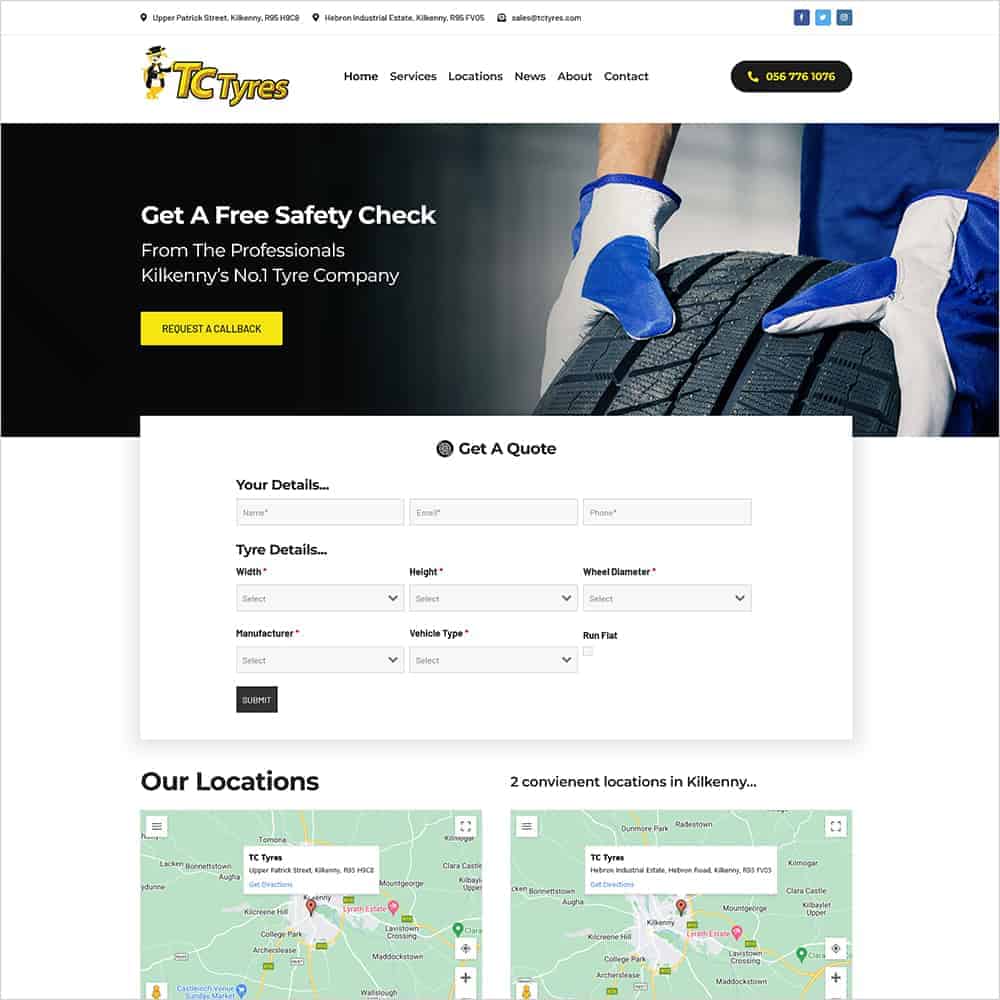
We built the TC Tyres website for the Kilkenny business. Its public website presents two locations, at Upper Patrick Street and Hebron Industrial Estate, alongside phone and email contact details. The homepage provides a callback route and a Get a Quote section.
The Services page identifies new tyres, puncture repairs, digital wheel balancing and four wheel laser alignment. It also presents commercial truck breakdown information separately from the everyday tyre services. Customers can explore the relevant service and find the company’s location information through the main navigation.
For another Irish tyre business, the useful lesson is to organise the website around the reason someone is visiting. A driver comparing tyres needs different information from a commercial customer seeking breakdown support. Prepare the service descriptions and contact routes together, then make the relevant depot clear before the customer sets off.
Explore the TC Tyres website, its services page and Kilkenny depot locations.
If the business offers a breakdown service, explain who it is for and how to request it. Keep that route distinct from an ordinary tyre quotation or contact form. State the relevant service area and operating arrangements that the business has approved.
Do not suggest that a general enquiry form is monitored continuously unless that is the agreed service. Check that published numbers reach the intended team and that any out-of-hours instructions are current. Avoid response time promises that depend on circumstances the website cannot confirm.
Check that visitors can read depot details and use phone links without enlarging the page. Forms should remain understandable on a small screen, with labels close to the relevant fields. Keep the service description connected to its contact option so the next step is easy to find.
Test the quote or callback form using agreed test details. Confirm that the information reaches the intended recipient and that the confirmation message explains what happens next. If the customer selected a depot, check that this choice remains clear in the enquiry received by the team.
Assign someone to approve changes to opening hours, contact numbers and services. Review the website when a depot changes its arrangements or the business adds a new capability. Check service pages and forms together so customers receive consistent information.
For a new website, gather current depot photographs and the service details your team wants customers to see. Supply the questions staff ask when handling a tyre enquiry. Those materials give your designer a practical basis for the site structure and the route from browsing to contact.
Explore our WordPress website design service or contact Istech to plan your tyre business website.